
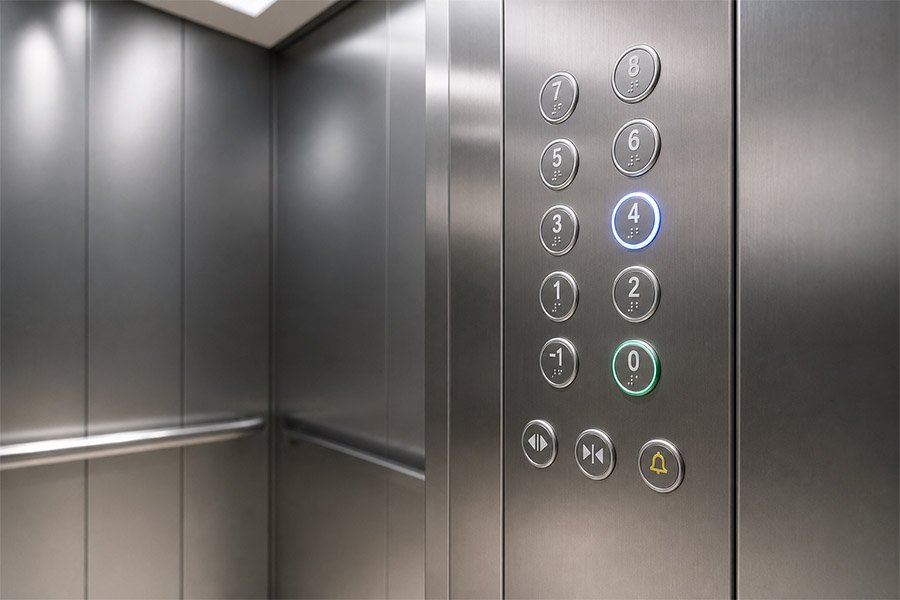
Los botones del ascensor constituyen la principal interfaz entre los pasajeros y el sistema de control del ascensor. Desde la selección de planta y el control de las puertas hasta la comunicación en caso de emergencia y la accesibilidad, los botones de las cabinas y los vestíbulos de los ascensores influyen directamente en la seguridad, la facilidad de uso y la experiencia del pasajero.
Mucha gente piensa que un botón de ascensor no es más que un pequeño interruptor. En realidad, los botones de ascensor modernos forman parte de una interfaz de control completa. Funcionan en conjunto con el COP, el LOP, el controlador, el cableado, las luces indicadoras, el sistema de puertas y el circuito de seguridad. Un botón de mala calidad puede provocar retrasos en la respuesta, una selección de planta poco clara, problemas con las puertas o una mala experiencia para el usuario.
Esta guía explica los botones del ascensor en términos sencillos. Aprenderás los principales tipos de botones de ascensor, el significado de los botones de ascensor, los símbolos más comunes de los ascensores, la disposición de los paneles, los materiales, consejos para su sustitución, y Cómo elegir el panel de botones de ascensor adecuado para tu proyecto.
Los botones del ascensor son dispositivos de control instalados en el interior de la cabina del ascensor o en el exterior de la puerta del ascensor. Los pasajeros los utilizan para seleccionar las plantas, llamar al ascensor, abrir o cerrar las puertas, activar una alarma o pedir ayuda en caso de emergencia.
Hay dos lugares principales en los que se instalan los botones de los ascensores:
Los botones de un ascensor pueden parecer sencillos, pero están conectados al sistema de control del ascensor. Cuando un pasajero pulsa un botón, el sistema recibe una señal eléctrica y decide qué acción llevar a cabo.
Entre los botones habituales de un ascensor se encuentran: botones de planta, botones para abrir puertas, botones para cerrar puertas, botones de alarma, botones de emergencia y botones de llamada. Algunos sistemas modernos también utilizan botones sin contacto, pantallas táctiles o interfaces de control de destino.
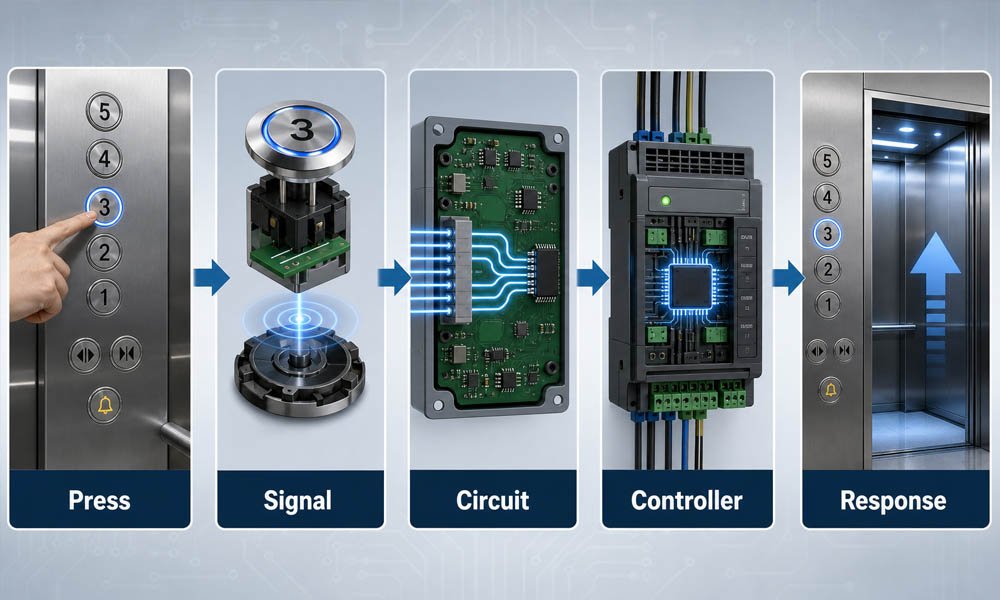
Los botones del ascensor funcionan convirtiendo la acción del pasajero en una señal eléctrica. Esa señal se envía al controlador del ascensor, que a continuación decide cómo debe responder el ascensor.
El proceso básico es fácil de entender:
Por ejemplo, cuando un pasajero pulsa el botón de una planta, el controlador comprueba la posición actual del ascensor, la dirección de marcha, el estado de carga, el estado de las puertas y el circuito de seguridad. Si todas las condiciones son correctas, el ascensor añadirá esa planta a su secuencia de recorrido.
Por eso es fundamental que la interfaz de un ascensor basada en botones sea fiable. El propio botón, la placa de circuito impreso, el cableado, la luz indicadora y el controlador deben funcionar en conjunto. Si falla alguna de estas piezas, es posible que el pasajero pulse el botón y no obtenga respuesta alguna.
Los distintos botones del ascensor tienen funciones diferentes. Una interfaz completa de ascensor suele incluir varios tipos de botones, cada uno de ellos diseñado para un uso específico.
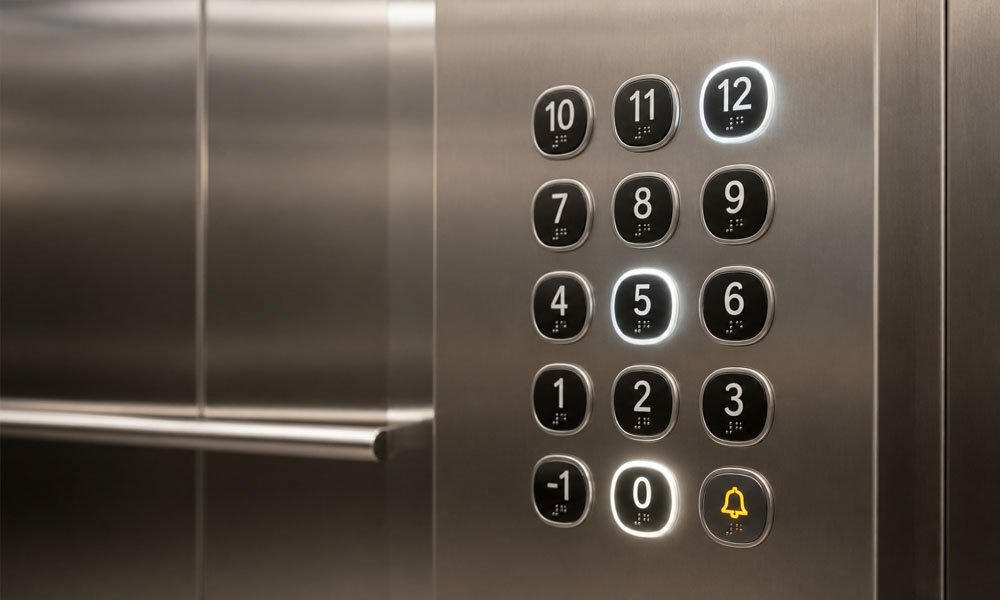
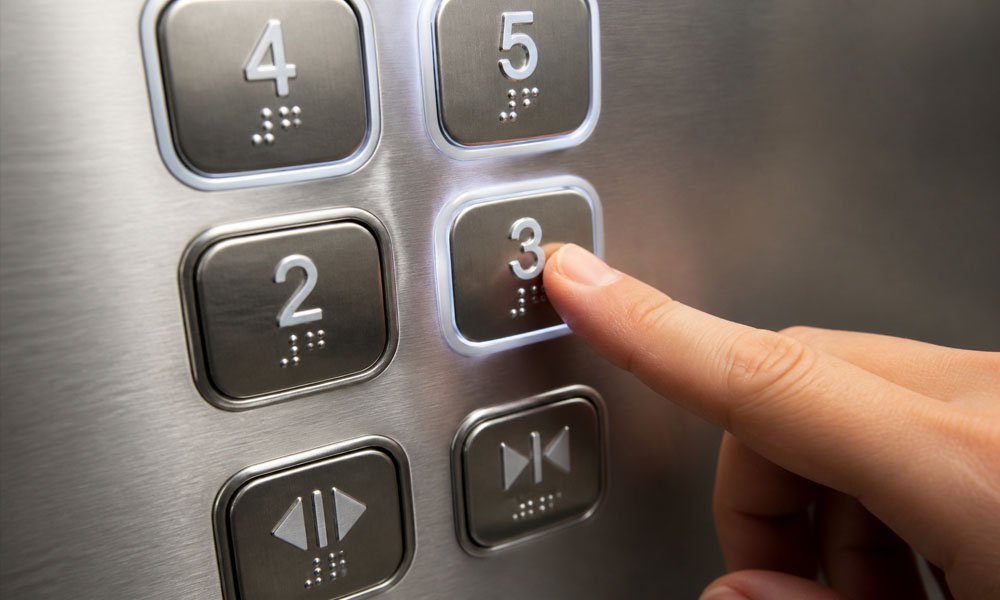
Los botones de planta del ascensor son los más habituales dentro de la cabina. Los pasajeros los pulsan para seleccionar la planta a la que desean llegar.
Estos botones pueden mostrar números, letras o nombres especiales de plantas. En muchos edificios, los botones de planta también incluyen braille, caracteres en relieve e iluminación LED. Cuando un pasajero pulsa un botón de planta, la luz se enciende para indicar que se ha aceptado la solicitud.
Un botón de planta de ascensor de alta calidad debe ser fácil de pulsar, fácil de leer y lo suficientemente resistente como para soportar el uso diario. En edificios con mucha afluencia, la superficie del botón debe resistir los arañazos, las huellas dactilares y las pulsaciones repetidas.
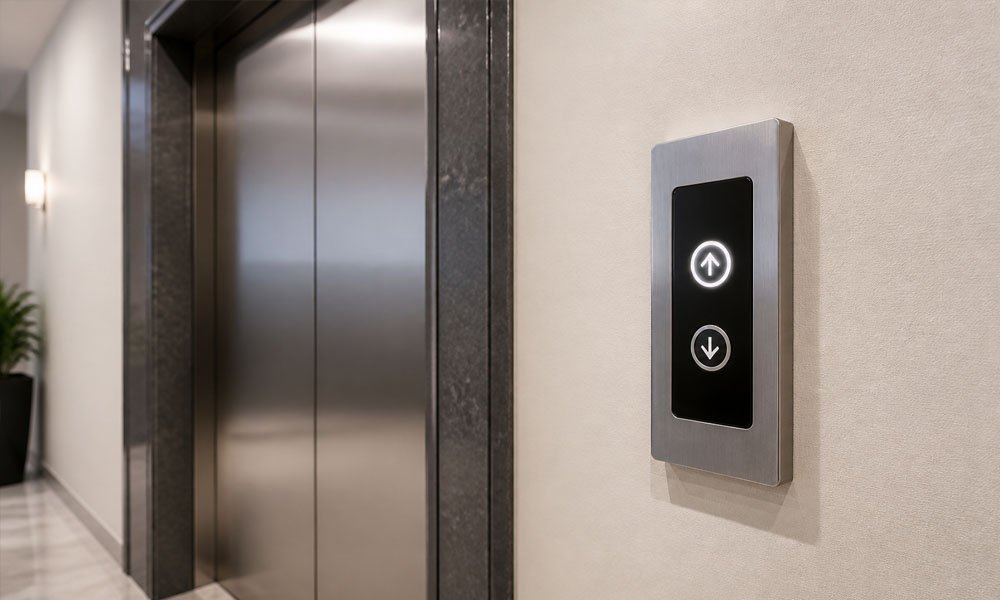
Los botones de llamada del ascensor están instalados en el exterior del ascensor, normalmente junto a la puerta del rellano. Los pasajeros los utilizan para llamar al ascensor y que suba a su planta.
En un edificio sencillo, el panel puede tener un solo botón de llamada. En edificios de varias plantas, el panel de la planta suele tener dos botones direccionales marcados con flechas hacia arriba y hacia abajo. Estas flechas del ascensor indican al sistema de control en qué dirección desea desplazarse el pasajero.
Un buen botón de llamada del ascensor debe ser visible desde una distancia razonable, fácil de pulsar y estar claramente iluminado tras su activación. En edificios de oficinas, hoteles, hospitales y torres residenciales, el diseño del botón de llamada también influye en la primera impresión que causa el sistema de ascensores.
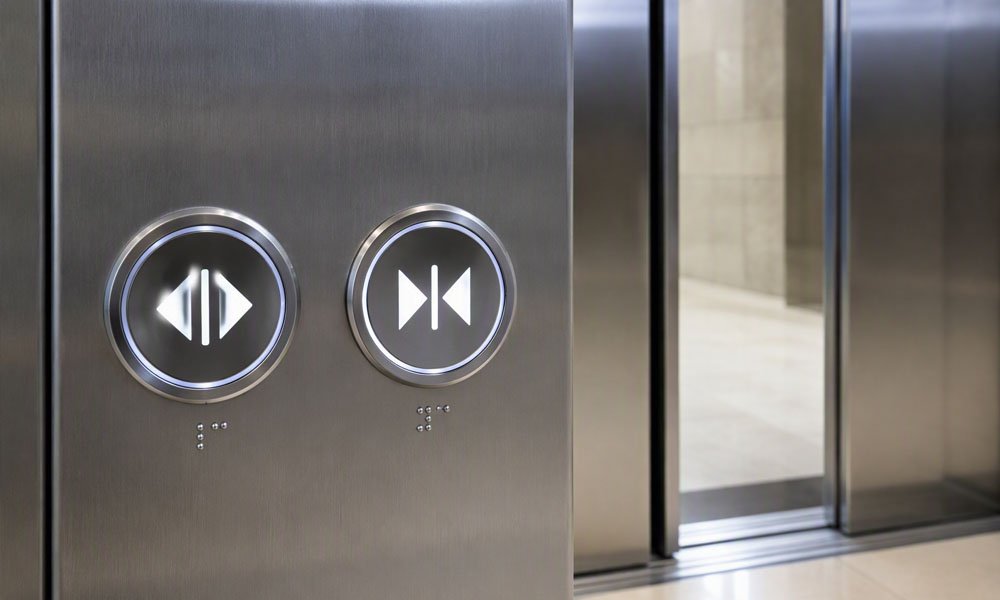
El botón de apertura de puertas sirve para mantener abiertas las puertas del ascensor durante más tiempo. Resulta útil cuando los pasajeros necesitan más tiempo para entrar o salir, especialmente en el caso de personas mayores, usuarios de sillas de ruedas o personas que transportan mercancías.
El botón para cerrar la puerta del ascensor es más complejo. Muchos pasajeros se preguntan: ¿Funcionan los botones para cerrar las puertas del ascensor? La respuesta depende del sistema de ascensores y de la normativa de seguridad local.
En algunos ascensores, el botón de cierre de puertas puede acortar el tiempo de apertura de las mismas. Sin embargo, en muchos ascensores públicos de pasajeros, esta función puede estar retardada o limitada por motivos de seguridad. El sistema debe conceder tiempo suficiente para que los pasajeros puedan entrar y salir con seguridad. Los sensores de las puertas, las cortinas ópticas y los ajustes del controlador pueden impedir el cierre inmediato.
Esto significa que el botón del ascensor para cerrar la puerta no siempre es una orden de anulación directa. Forma parte de la lógica de control de la puerta, y la seguridad es siempre lo primero.
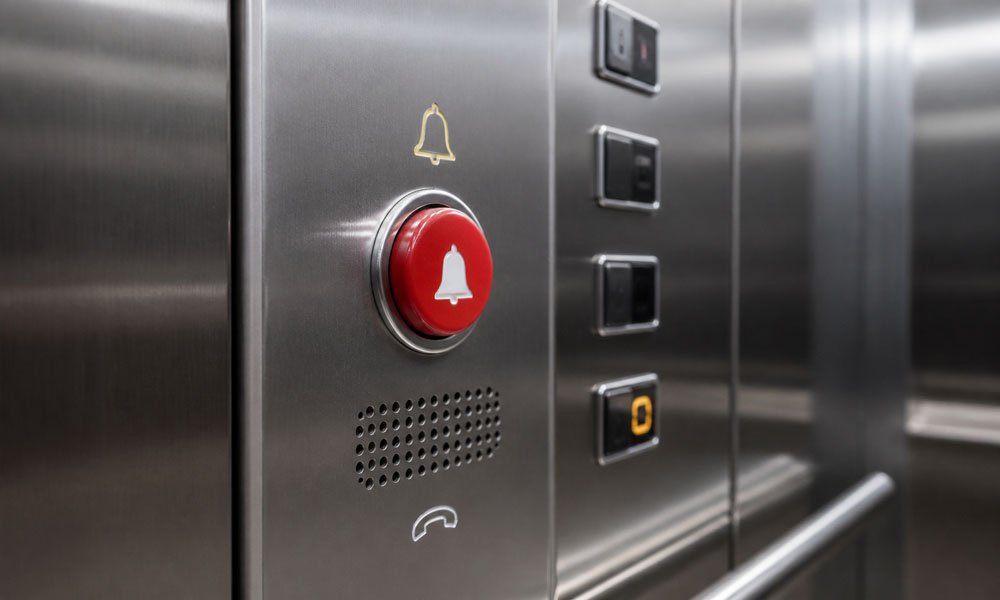
El botón de emergencia del ascensor se utiliza cuando los pasajeros necesitan ayuda. Puede estar conectado a una campana de alarma, a un intercomunicador, a la sala de seguridad del edificio o a un sistema de vigilancia remota, dependiendo del diseño del ascensor.
Mucha gente también pregunta: ¿Para qué sirve el botón de la campana en un ascensor? En la mayoría de los casos, el botón de la campana del ascensor se utiliza para avisar a las personas que se encuentran fuera del ascensor de que se necesita ayuda. En los sistemas más avanzados, el botón de emergencia también puede activar una comunicación bidireccional.
Los botones de emergencia deben ser fáciles de identificar. Suelen ser de color rojo o estar marcados con el símbolo de una campana, un teléfono o una alarma. Además, deben estar protegidos contra daños accidentales y someterse a pruebas durante el mantenimiento periódico.
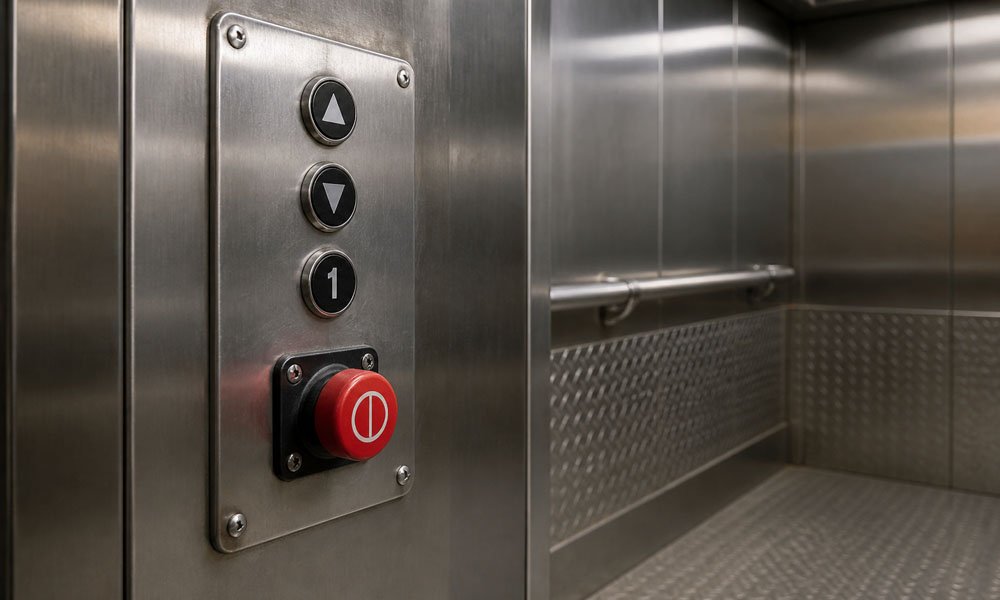
El botón de parada del ascensor no es habitual en todos los ascensores de pasajeros. Se encuentra con mayor frecuencia en ascensores de carga, ascensores de servicio, paneles de control de inspección o sistemas más antiguos.
El botón de parada no es lo mismo que el botón de alarma de emergencia. El botón de alarma sirve para pedir ayuda. El botón de parada puede detener o interrumpir el movimiento del ascensor en determinadas condiciones de funcionamiento.
Los pasajeros normales no deben utilizar el botón de parada del ascensor de forma indiscriminada. En muchos ascensores modernos para pasajeros, esta función está restringida o desactivada para evitar un uso indebido.
Los botones de ascensor en braille ayudan a los pasajeros con discapacidad visual a identificar las plantas y las funciones mediante el tacto. Suelen incluir puntos en relieve, números en relieve y marcas táctiles claras.
Un buen diseño de accesibilidad no debe basarse únicamente en el braille. También debe tener en cuenta:
Los botones en braille son especialmente importantes en edificios públicos, hospitales, hoteles, centros de transporte y edificios comerciales.
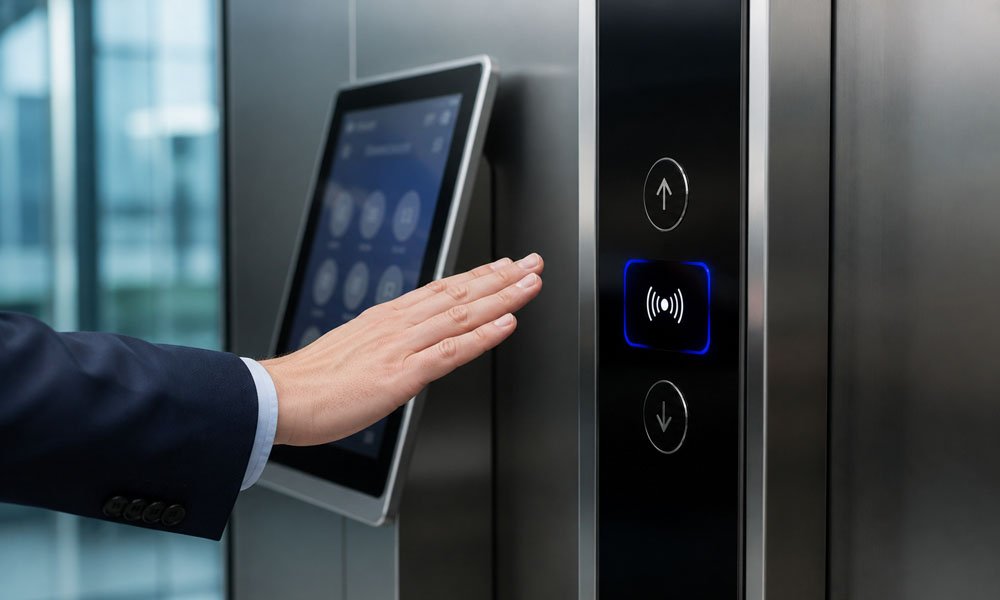
Los botones sin contacto utilizan sensores para detectar un dedo o una mano sin contacto directo. Han ganado popularidad en edificios con mucha afluencia de público, donde la higiene es importante.
Las interfaces inteligentes para ascensores también pueden incluir pantallas táctiles, llamadas a través de aplicaciones móviles, lectores de tarjetas, acceso mediante códigos QR, sistemas de control de destino o comandos de voz. Estos sistemas pueden mejorar la experiencia del usuario, pero no son adecuados para todos los proyectos.
Antes de optar por botones de ascensor inteligentes o sin contacto, los compradores deben tener en cuenta el coste, el mantenimiento, la velocidad de respuesta, la estabilidad y los hábitos de los usuarios. Un simple botón mecánico de ascensor suele seguir siendo la mejor opción para proyectos que requieren durabilidad, poco mantenimiento y facilidad de sustitución.
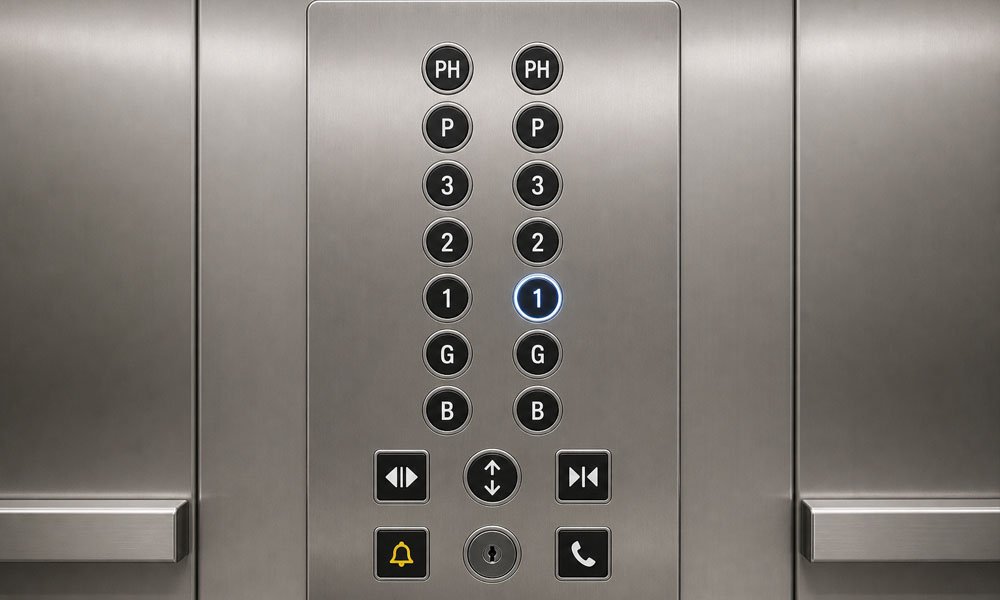
Muchos usuarios buscan el significado de los botones del ascensor, ya que los símbolos y las letras de los ascensores no siempre resultan evidentes. Algunos símbolos son estándar, mientras que otros dependen del diseño del edificio.
En la tabla siguiente se explican los significados habituales de los botones de los ascensores.
| Botón o símbolo | Significado | Uso habitual |
|---|---|---|
| Teclas numéricas | Selecciona una planta de destino | En el interior de la cabina |
| Flecha hacia arriba | Llamar a un ascensor que sube | Panel de aterrizaje |
| Flecha hacia abajo | Llamar a un ascensor que baja | Panel de aterrizaje |
| Símbolo de puerta abierta | Mantén las puertas abiertas más tiempo | En el interior de la cabina |
| Símbolo de «cerrar la puerta» | Pide que se cierren las puertas | En el interior de la cabina |
| Símbolo de la campana | Alarma o llamada de auxilio | En el interior de la cabina |
| Símbolo de teléfono | Comunicaciones de emergencia | En el interior de la cabina |
| G | Planta baja | Planta de la entrada principal |
| B o LL | Sótano o planta baja | Plantas de aparcamiento o de servicios |
| P | Planta de aparcamiento | Plantas de aparcamiento |
| M | Planta baja o entreplanta | Edificios comerciales |
| PH | Ático | Planta residencial superior o de lujo |
| S | Calle, vestíbulo con vistas al cielo, planta de servicios o planta especial | Uso específico del edificio |
Por eso, unos botones de ascensor explicados con claridad resultan útiles tanto para los pasajeros como para los propietarios de los edificios. Una interfaz de ascensor clara reduce la confusión y mejora el flujo de personas.
Algunas etiquetas no son universales. Por ejemplo, la gente puede preguntar ¿Qué significa «ND» en un ascensor? o ¿Qué significa «EZ» en un ascensor?. Por lo general, se trata de etiquetas específicas de cada edificio. «ND» puede tener distintos significados según el inmueble, y «EZ» puede referirse a una zona especial, una zona rápida, una zona de evacuación u otro sistema de nomenclatura local. Se recomienda confirmar el significado correcto consultando el plano del edificio o en la oficina de administración.
El panel de botones de un ascensor debe ser fácil de entender de un solo vistazo. La disposición depende del número de plantas, el tipo de edificio, el tamaño de la cabina, los requisitos de accesibilidad y el estilo de diseño.
| Tipo de maquetación | Ideal para | Ventaja | Limitación |
|---|---|---|---|
| Diseño lineal | Edificios de baja altura | Sencillo y fácil de leer | No es la opción ideal para muchos suelos |
| Diseño en cuadrícula | Edificios de gran altura | Ahorra espacio y permite organizar muchos botones | Es necesario agrupar los elementos de suelo de forma clara |
| Distribución por zonas | Edificios de uso mixto | Plantas destinadas a aparcamientos, oficinas, hoteles y viviendas | Requiere un etiquetado minucioso |
| Diseño vertical | Cabinas estándar | Se adapta al movimiento natural de la mano | Puede que se alargue en edificios altos |
| Interfaz táctil | Edificios inteligentes | Flexible y moderno | Mayor coste y mantenimiento |
| Panel de cristal decorativo | Hoteles y proyectos de lujo | Gran impacto visual | Requiere una limpieza y una protección cuidadosas |
El panel de botones de un ascensor no solo debe tener un aspecto atractivo, sino que también debe ayudar a los pasajeros a tomar decisiones rápidamente. Si los usuarios tardan demasiado en encontrar el botón correcto, la disposición no es adecuada.
En el caso de los edificios de gran altura, suele ser mejor un panel de botones de ascensor en forma de cuadrícula o dividido en zonas que una larga lista vertical. En los hoteles, el panel debe integrarse con el diseño interior, al tiempo que los símbolos y los números deben ser fáciles de leer. En los hospitales, la claridad y la higiene son más importantes que la decoración.
El material del panel de botones de un ascensor influye en su durabilidad, aspecto, mantenimiento y coste. Cada edificio requiere un material distinto.
El acero inoxidable es uno de los materiales más habituales para los paneles de botones de los ascensores. Es duradero, resistente a la corrosión y adecuado para edificios con mucho tráfico.
Es una opción ideal para edificios de oficinas, apartamentos, hospitales, centros comerciales e instalaciones públicas. Además, el acero inoxidable cepillado disimula mejor las huellas dactilares y los pequeños arañazos que muchos materiales brillantes.
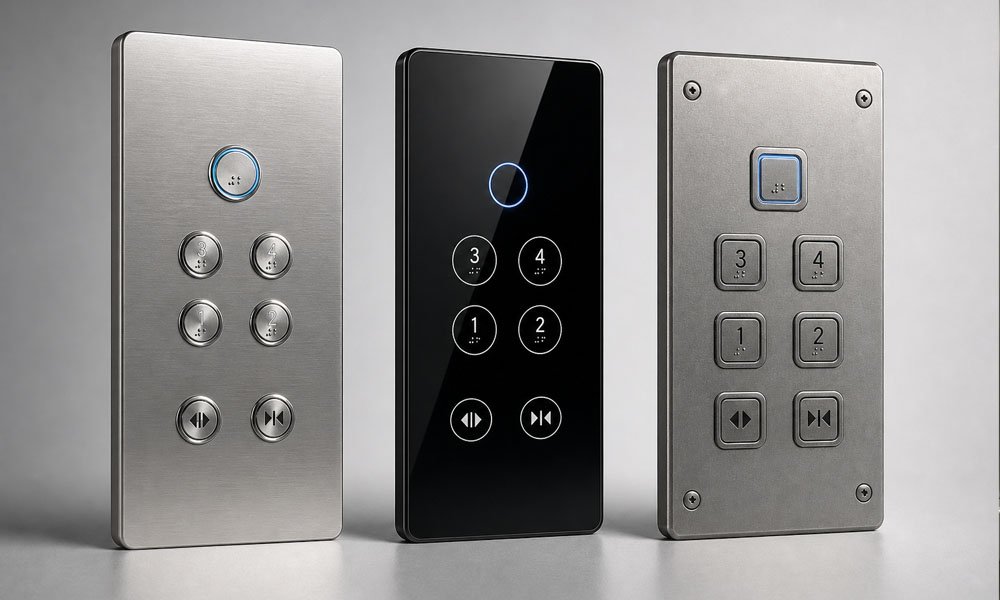
Los botones y paneles de cristal para ascensores se utilizan a menudo en hoteles, apartamentos de lujo y edificios comerciales modernos. Aportan un aspecto limpio y de alta calidad.
Sin embargo, las superficies de cristal requieren una limpieza más minuciosa y una protección especial. Además, en ellas se ven las huellas dactilares con mayor facilidad. En el caso de los botones de los ascensores de los hoteles, el cristal o el acero inoxidable espejado pueden transmitir una imagen de alta gama cuando se combinan con una iluminación suave e iconos claros.
La aleación de aluminio es ligera y moderna. Se puede anodizar en diferentes colores y acabados. Resulta útil para proyectos en los que se busca un aspecto técnico y limpio sin el peso del acero inoxidable.
Los botones de plástico o acrílico son opciones más económicas. Pueden ser adecuados para proyectos con un presupuesto limitado o para aplicaciones con poco uso. Sin embargo, suelen tener una menor resistencia a los arañazos y una vida útil más corta en comparación con las opciones metálicas.
Los pulsadores antivandálicos están diseñados para zonas públicas, colegios, estaciones de transporte y edificios industriales. Suelen estar fabricados con superficies metálicas más resistentes y estructuras mecánicas más robustas.
En el caso de los montacargas y los ascensores de servicio de uso intensivo, la durabilidad debe primar sobre el estilo decorativo.
La elección de los botones del ascensor no es solo una cuestión de diseño, sino también una decisión técnica y de mantenimiento. La elección adecuada depende del uso que se le dé al ascensor, de quién lo utilice y del sistema al que deba conectarse.
Antes de encargar botones de repuesto para el ascensor o un nuevo panel de botones, comprueba que sean compatibles con el sistema actual.
Entre los puntos importantes se incluyen:
Un botón que parezca funcionar correctamente puede fallar si el cableado o el tipo de señal no se ajustan al controlador.
Cada edificio tiene sus propias prioridades.
| Tipo de edificio | Áreas de interés recomendadas |
|---|---|
| Edificio residencial | Botones duraderos, sencillos y económicos |
| Hotel | Mejor aspecto, iluminación nítida, acabado de alta calidad |
| Hospital | Fácil limpieza, accesibilidad y botones de emergencia fiables |
| Centro comercial | Alta durabilidad, diseño antivandálico, símbolos claros |
| Torre de oficinas | Disposición ordenada, fácil identificación, diseño moderno |
| Montacargas | Botones mecánicos resistentes, etiquetas sencillas, resistencia a los golpes |
Los botones de los ascensores de los hoteles pueden hacer mayor hincapié en el diseño visual. Los botones de los montacargas deben priorizar la resistencia. Los botones de los ascensores de los hospitales deben centrarse en la higiene, la accesibilidad y un funcionamiento fiable en caso de emergencia.
La accesibilidad debe tenerse en cuenta desde el principio. Los botones de los ascensores deben estar diseñados para que puedan utilizarlos el mayor número posible de personas.
Entre los puntos clave se incluyen:
La altura de los botones del ascensor en el interior debe cumplir con la normativa local en materia de accesibilidad. Dado que los requisitos varían según el país y la región, el equipo del proyecto debe confirmar la normativa aplicable antes de la fabricación.
Un botón bonito no sirve de nada si es difícil de cambiar. En un edificio muy concurrido, los botones pueden pulsarse miles de veces al mes. La facilidad de mantenimiento es importante.
Elige diseños con piezas de recambio fácilmente disponibles, un cableado claro y que sean fáciles de sustituir. En los proyectos de modernización, es más importante que los nuevos botones del ascensor sean compatibles con el sistema de control y el cableado existentes que su mera apariencia.
Los problemas con los botones de los ascensores son habituales en los ascensores antiguos y en los edificios con mucho tráfico. Algunos problemas se deben al propio botón, mientras que otros se deben al cableado, a las placas de circuito impreso o a la configuración del controlador.
| Problema | Posible causa | Medida recomendada |
|---|---|---|
| El botón no responde | Fallo del interruptor, problema de cableado, problema en la placa de circuito impreso | Comprueba el contacto del botón y el circuito |
| La luz indicadora no se enciende | Fallo del LED o problema de cableado | Sustituir el LED o revisar el cableado del panel |
| Button se siente estancado | Polvo, muelles desgastados, desgaste mecánico | Limpia o sustituye el botón |
| Comando de planta incorrecto | Error de cableado o problema con la señal del controlador | Comprueba el cableado de COP o LOP |
| Retardo del botón de cierre de la puerta | Configuración de seguridad o lógica del controlador | Confirmar la configuración del ascensor |
| El botón de emergencia no funciona | Fallo del circuito de alarma o de la comunicación | Revisar inmediatamente |
| Superficie del botón desgastada | Uso prolongado o materiales de baja calidad | Sustituir la tapa del botón o el panel |
Estos problemas no deben pasarse por alto. Un botón de ascensor que no funciona puede minar la confianza de los pasajeros y puede ser indicativo de problemas eléctricos o de mantenimiento más graves.
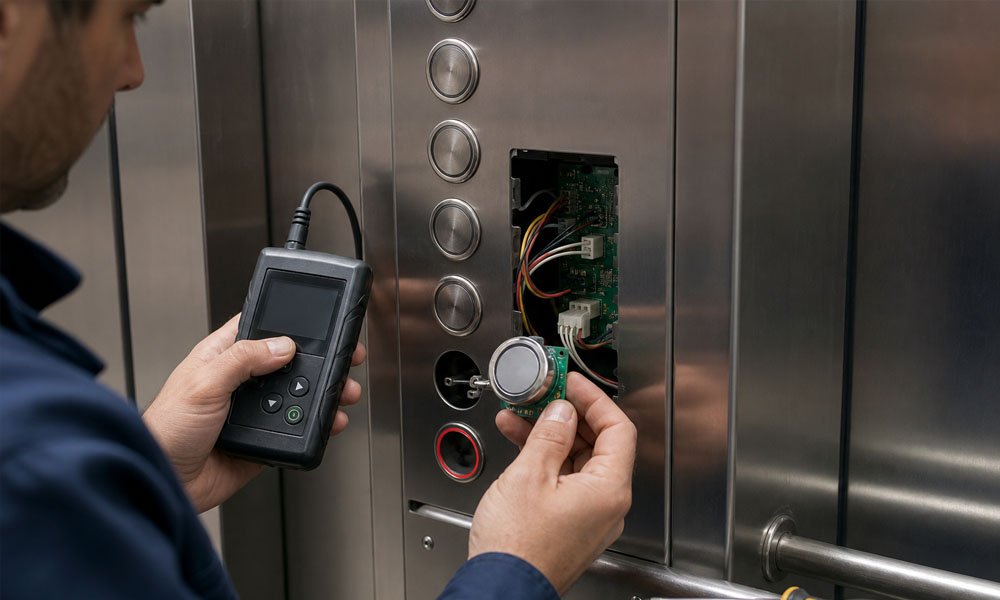
Los botones de los ascensores suelen necesitar ser sustituidos durante la modernización, la renovación de la cabina o el mantenimiento periódico.
Entre los motivos habituales para la sustitución se incluyen:
La personalización también es habitual en los proyectos nuevos y en los de modernización. Los compradores pueden necesitar números de planta personalizados, marcas en braille, colores de LED, materiales de los paneles, formas de los botones, símbolos o etiquetas específicas para cada proyecto.
Por ejemplo, un hotel puede optar por botones de ascensor de cristal con una iluminación de fondo cálida. Un hospital puede optar por botones de acero inoxidable con marcas táctiles claras. Una torre de oficinas puede necesitar un panel de botones de ascensor de gran tamaño con zonas de plantas agrupadas.
La mejor personalización no solo es atractiva. Debe mejorar la facilidad de uso, adaptarse al sistema de control y reducir los problemas de mantenimiento futuros.
Los botones de los ascensores deben estar diseñados para garantizar un funcionamiento seguro y claro. Los distintos países y regiones pueden tener normativas diferentes en materia de ascensores, por lo que los equipos de proyecto deben confirmar siempre los requisitos locales.
Entre las consideraciones importantes en materia de accesibilidad y seguridad se incluyen:
Algunos usuarios buscan Cómo utilizar las llaves del ascensor. Las llaves de los ascensores no suelen estar destinadas a los pasajeros en general. Las utiliza el personal de mantenimiento autorizado, los bomberos o el personal de administración del edificio. Un uso incorrecto puede suponer un riesgo para la seguridad.
Por este motivo, los interruptores de llave, los mandos de inspección, los mandos para los servicios de bomberos y los botones de operaciones especiales deben estar claramente separados de los botones normales para los pasajeros.
El símbolo que representa el ascensor en un plano de planta es distinto del símbolo del botón del ascensor. En los planos de planta se suelen utilizar iconos gráficos sencillos para indicar la ubicación del ascensor, la posición del hueco o las zonas de transporte vertical.
En los planos arquitectónicos, los símbolos de los ascensores ayudan a los diseñadores, contratistas y usuarios del edificio a saber dónde se encuentra el ascensor. Sin embargo, en el panel de control del ascensor, los símbolos deben ayudar a los pasajeros a utilizarlo de forma segura.
Esta distinción es importante. El símbolo de un plano de planta facilita la orientación en el edificio. El símbolo de un botón de ascensor facilita su uso directo.
Los botones de ascensor son dispositivos de control que se utilizan para seleccionar plantas, llamar a los ascensores, abrir o cerrar puertas y activar funciones de emergencia. Suelen instalarse en el panel de mando de la cabina o en el panel de mando del rellano.
El significado de los botones del ascensor depende del símbolo o la etiqueta. Los botones numéricos sirven para seleccionar las plantas. Las flechas hacia arriba y hacia abajo sirven para llamar al ascensor. Los símbolos de puerta controlan la apertura o el cierre de la puerta. Los símbolos de timbre o teléfono están relacionados con la ayuda de emergencia.
Cada botón del ascensor envía una orden específica al sistema de control del ascensor. El botón de planta selecciona el destino. El botón de llamada solicita el servicio del ascensor. El botón de apertura de puertas mantiene las puertas abiertas. El botón de emergencia solicita ayuda.
Algunos botones de cierre de los ascensores funcionan, pero muchos están controlados por ajustes de seguridad. En los ascensores públicos de pasajeros, la función de cierre de puertas puede retrasarse o limitarse para proteger a los pasajeros de un cierre demasiado rápido de las puertas.
El botón de la campana del ascensor suele activar una alarma o una señal de socorro. En algunos sistemas, también puede estar conectado a un intercomunicador o al sistema de seguridad del edificio.
El botón de emergencia del ascensor se utiliza cuando los pasajeros se quedan atrapados, se sienten inseguros o necesitan ayuda. No debe pulsarse sin motivo.
Si pulsas por error un botón de llamada normal o un botón de planta, es posible que el ascensor simplemente registre la solicitud. Si pulsas por error un botón de llamada de emergencia, sigue las instrucciones del sistema y explica el error si te ponen en contacto con el personal de seguridad o de vigilancia.
«ND» no es una indicación universal en los ascensores. Puede referirse a una planta, un departamento, una zona o un área de servicio concretos de un edificio. Se recomienda consultar el significado correcto con la administración del edificio o en el directorio de plantas.
Además, «EZ» no es un código universal para ascensores. Puede referirse a una zona rápida, una zona de evacuación u otra denominación específica del proyecto. El significado depende del sistema de nomenclatura propio del edificio.
La altura de los botones en el interior del ascensor depende de la normativa local en materia de accesibilidad. En general, los botones deben colocarse en un lugar al que la mayoría de los pasajeros, incluidos los usuarios de sillas de ruedas, puedan acceder cómodamente. Sigue siempre la normativa local sobre ascensores y accesibilidad vigente en la ubicación del proyecto.
Los botones de ascensor de cristal se utilizan a menudo en hoteles, apartamentos de lujo y edificios comerciales modernos. Aportan un aspecto limpio y de alta calidad, pero requieren una limpieza cuidadosa y una buena protección.
Los botones de llamada del ascensor están situados fuera de la cabina y sirven para llamar al ascensor para que suba a una planta. Los botones de planta del ascensor están situados dentro de la cabina y sirven para seleccionar la planta de destino.
Los botones de los ascensores pueden parecer componentes pequeños, pero influyen directamente en la seguridad de los pasajeros, la accesibilidad y el funcionamiento diario del ascensor. Una interfaz clara del ascensor ayuda a los pasajeros a seleccionar las plantas, comprender los símbolos del ascensor, utilizar las funciones de emergencia y desplazarse por el edificio con confianza.
Tanto si necesitas botones estándar para ascensores, paneles de botones personalizados, botones en braille, botones de cristal para ascensores, botones para ascensores de hotel o botones de recambio para un proyecto de modernización, es fundamental elegir el diseño adecuado y los componentes compatibles.
Si necesitas soluciones profesionales para botones de ascensor, ya sea para una nueva instalación, una reparación o un proyecto de modernización, ponte en contacto con nuestro equipo para recibir asistencia técnica y un presupuesto competitivo.