
أن مصعد COP, ، أو لوحة تشغيل المصعد، هي واجهة التحكم الرئيسية داخل كابينة المصعد. وهي تتيح للركاب اختيار الطوابق، وفتح الأبواب أو إغلاقها، وطلب المساعدة، والاطلاع على حالة المصعد. وبالنسبة لمالكي المباني والمقاولين وفرق صيانة المصاعد، فإن اختيار لوحة تشغيل المصعد المناسبة يؤثر على التشغيل اليومي، وسهولة الوصول، والمظهر، والصيانة على المدى الطويل.
في السوق،, مصعد COP عادةً ما تُصنف هذه الأنواع بناءً على واجهتها ووظيفتها. ومن المصطلحات الشائعة: لوحة تشغيل المصعد (COP) ذات الأزرار، ولوحة تشغيل المصعد (COP) المزودة بشاشة رقمية، ولوحة تشغيل المصعد (COP) ذات الأزرار التي تعمل باللمس، ولوحة تشغيل المصعد (COP) التي تعمل باللمس، ولوحة تشغيل المصعد (COP) التي تعمل بدون لمس. يشرح هذا الدليل هذه الأنواع الرئيسية بطريقة واضحة، حتى تتمكن من معرفة أي لوحة تشغيل للمصعد تناسب مشروعك.
COP تعني لوحة التحكم في السيارة. وهي اللوحة المثبتة داخل كابينة المصعد. ويستخدمها الركاب لاختيار الطابق المقصود، والتحكم في الباب، وتشغيل جهاز الإنذار، أو استخدام وظائف خاصة عند الحاجة.
أن لوحة التحكم في كابينة المصعد وهو يختلف عن لوحة التشغيل عند الطابق (LOP). تُركَّب لوحة التشغيل عند الطابق (LOP) خارج المصعد، بجانب باب الطابق. ويستخدم الركاب لوحة التشغيل عند الطابق (LOP) لاستدعاء المصعد إلى طابقهم. أما لوحة التحكم (COP) فتُستخدم بعد دخول الركاب إلى المقصورة.
نموذج لوحة التحكم في سيارة المصعد يتصل النظام بوحدة التحكم في المصعد. وعندما يضغط الراكب على زر أو يلمس واجهة المستخدم، يرسل جهاز COP إشارة إلى وحدة التحكم. ثم تتحقق وحدة التحكم من حالة المصعد وتنفذ الإجراء المناسب.
أن لوحة التحكم في المصعد إنها ليست مجرد صف من الأزرار. بل هي وحدة تشغيل متكاملة. ويعتمد التكوين الدقيق على نوع المصعد، والغرض من المبنى، ومتطلبات العميل.
| جزء | الوظيفة الرئيسية |
|---|---|
| أزرار الطوابق | اختر الطوابق المقصودة |
| أزرار فتح/إغلاق الباب | التحكم في وقت فتح الباب |
| زر الإنذار في حالات الطوارئ | اطلب المساعدة في حالات الطوارئ |
| جهاز اتصال داخلي أو وحدة هاتفية | دعم الاتصال في الاتجاهين |
| مؤشر الطابق | إظهار الطابق الحالي والاتجاه |
| شاشة العرض | عرض الحالة أو الرسائل أو معلومات الخدمة |
| برايل / العلامات اللمسية | دعم المستخدمين ذوي الإعاقة البصرية |
| مفاتيح التبديل | يستخدمه موظفو الصيانة أو الإطفاء المعتمدون |
| قارئ التحكم في الدخول | تقييد الوصول إلى طوابق معينة |
| اللوحة الأمامية | حماية الأجزاء الداخلية وإبراز المظهر |
يجب أن يكون التصميم سهل الفهم. تصميم جيد لوحة التحكم في المصعد ينبغي أن يساعد الركاب على العثور على الزر الصحيح بسرعة، وتأكيد أمرهم بوضوح، ودعم التشغيل الآمن أثناء الاستخدام اليومي.
أفضل طريقة لفهم مصعد COP لا يقتصر تصنيف الأنواع على المادة فحسب. فالفولاذ المقاوم للصدأ والزجاج والألمنيوم عناصر مهمة، لكنها تصف بشكل أساسي تشطيب السطح. أما عند اختيار مشروع حقيقي، فمن الأجدى تصنيف COP وفقًا للواجهة والوظيفة.
فيما يلي أنواع الأسواق الشائعة، مرتبة من الأساسية والموثوقة إلى الأكثر رقمية وذكية.
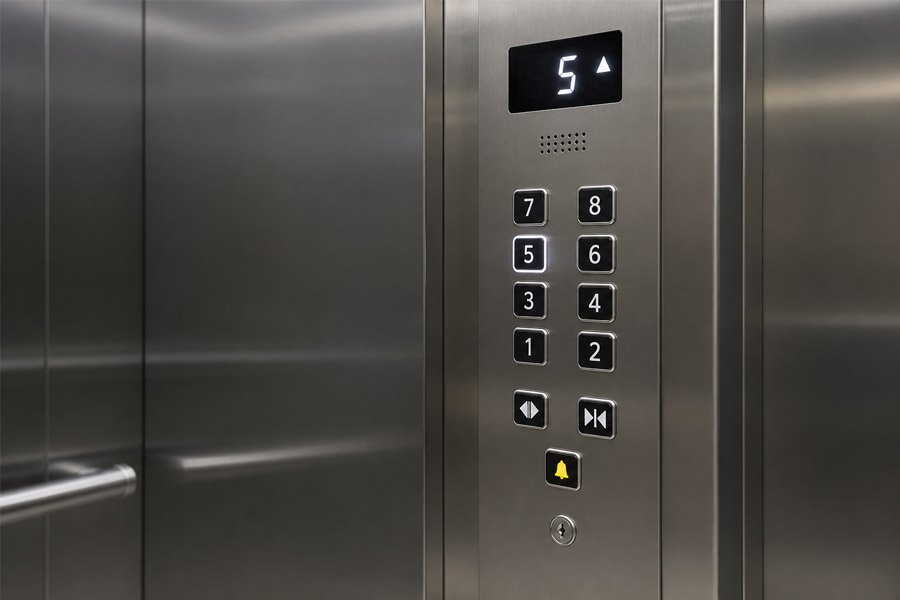
A مصعد يعمل بضغطة زر COP وهو النوع الأكثر شيوعًا من لوحات التحكم في السيارات. ويستخدم أزرارًا مادية لاختيار الطابق، والتحكم في الأبواب، ووظائف الإنذار، وغيرها من العمليات الأساسية.
ويمكن أيضًا وصف هذا النوع بأنه زر ضغط ميكانيكي COP, ، وهو مصعد مزود بجهاز التحكم (COP) وأزرار الضغط, ، أو لوحة تشغيل السيارة من نوع الأزرار. تختلف هذه الأسماء قليلاً، لكنها تشير عادةً إلى نفس النوع العام من المنتجات.
تحظى أزرار التحكم (COPs) بشعبية كبيرة لكونها بسيطة وموثوقة. حيث يفهم الركاب طريقة استخدامها على الفور. كما يمكن لفنيي الصيانة استبدال الأزرار الفردية بسهولة أكبر مقارنة بالواجهات الرقمية المعقدة.
في العديد من المشاريع، زر ضغط مصعد COP لا يزال الخيار الأكثر عملية. وقد لا تبدو مستقبلية بقدر شاشة اللمس، لكنها غالبًا ما تتمتع بمتانة أفضل، وصيانة أسهل، وتكلفة استبدال أقل.
عند اختيار هذا النوع، ركز على الأجزاء التي تؤثر على الاستخدام اليومي:
قد يبدو زر الضغط ذو الجودة الرديئة متراخياً، أو يفقد إضاءته، أو يتعطل بعد الاستخدام المتكرر. وفي المباني المزدحمة، يجب أن يكون سطح الزر مقاوماً للخدوش وبصمات الأصابع والضغط المتكرر.
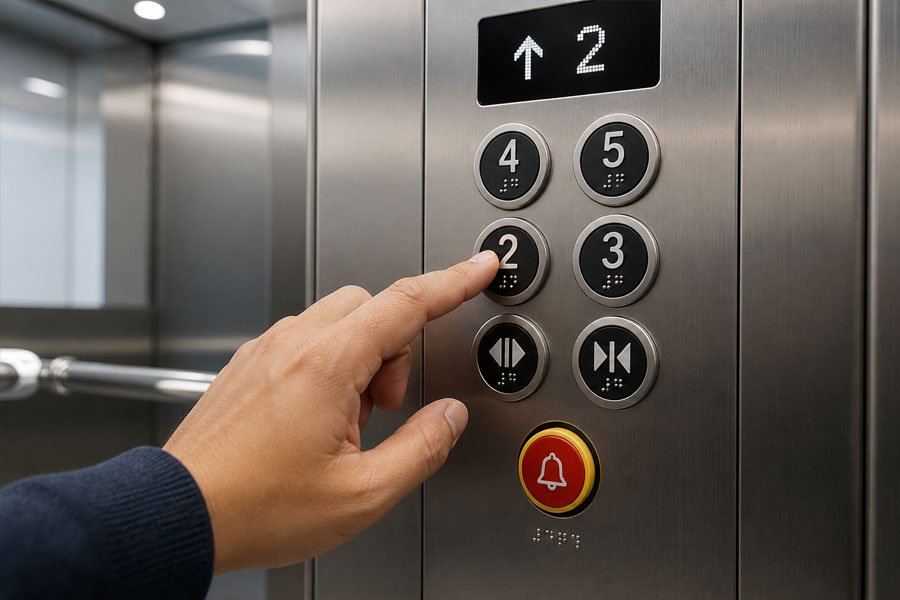
أن مصعد مجهز بتقنية COP وقد صُمم لتسهيل استخدامه من قِبل الركاب ذوي الإعاقة البصرية، وكبار السن، ومستخدمي الكراسي المتحركة، وغيرهم ممن يحتاجون إلى دعم أوضح في التشغيل.
في السوق، قد يُطلق على هذا النوع أيضًا اسم مصعد مزود بنظام برايل (COP), ، أ وحدة التحكم (COP) المزودة بأزرار ملموسة, ، أو لوحة التحكم في السيارة الميسرة الاستخدام. لا يزال من الممكن استخدام الأزرار العادية، لكن يجب أن يولي التصميم مزيدًا من الاهتمام بسهولة الوصول.
لا تقتصر إمكانية الوصول على مجرد إضافة نقاط برايل. النص الكامل لوحة التحكم في كابينة المصعد يجب أن تكون سهلة العثور عليها وقراءتها ولمسها واستخدامها. وينبغي على المشترين التحقق من قواعد إمكانية الوصول المحلية قبل تأكيد تصميم اللوحة.
يجب أن تكون حروف برايل والحروف البارزة واضحة ومتينة. ويجب ألا تكون الأزرار صغيرة جدًّا أو موضوعة في مكان مرتفع جدًّا. كما يجب أن تكون الشاشة ساطعة بدرجة كافية، وأن يكون زر الطوارئ سهل التمييز.
هذا النوع ليس مجرد نسخة مطورة من المصعد القياسي (COP). بل تكمن قيمته الحقيقية في التصميم الذي يركز على الإنسان. فهو يساعد عددًا أكبر من الركاب على استخدام المصعد بأمان وبشكل مستقل.
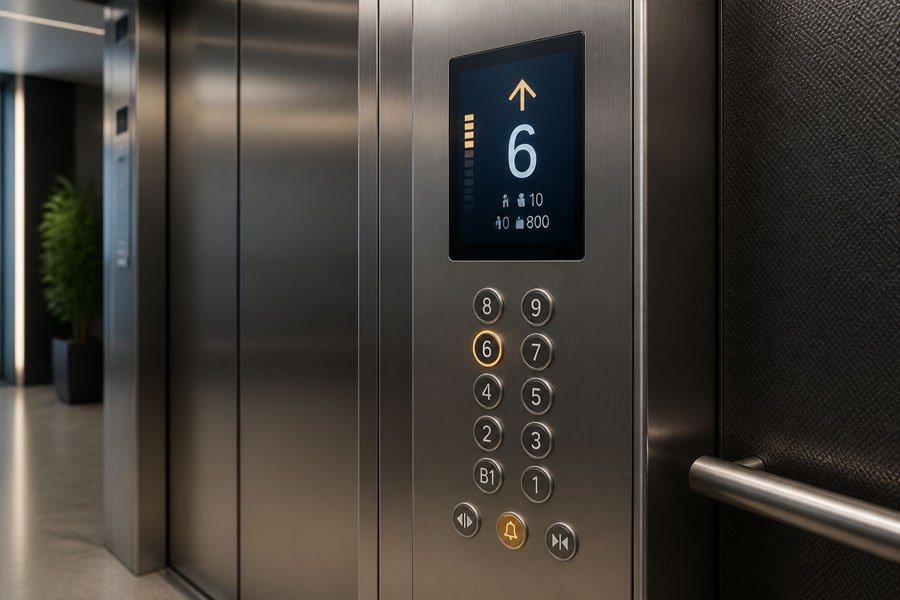
أن مؤشر استهلاك الوقود (COP) للمصعد مع شاشة رقمية تضيف وحدة عرض إلى لوحة التحكم. وقد تظل تستخدم أزرارًا مادية، لكنها توفر للركاب معلومات أكثر مما توفره لوحة التحكم الأساسية التي تعتمد على الأزرار فقط.
تشمل الأوصاف الشائعة للأسواق ما يلي: مقياس ضغط الهواء المزود بمؤشر مستوى السطح, وحدة التحكم في المصعد المزودة بشاشة LCD, ، أو لوحة التحكم في السيارة المزودة بشاشة عرض.
اعتمادًا على نظام المصعد، قد تعرض الشاشة ما يلي:
يُرقّي هذا النوع نظام التحكم (COP) من مجرد جهاز إدخال بسيط إلى واجهة للإدخال والتغذية الراجعة. فلا يقتصر دور الركاب على الضغط على زر فحسب، بل يتلقون أيضًا معلومات واضحة حول ما يقوم به المصعد.
على سبيل المثال، يمكن لمؤشر الطابق أن يقلل من الارتباك في المباني الكبيرة. ويمكن لشاشة عرض الاتجاه أن تساعد الركاب على معرفة ما إذا كان المصعد يتجه صعودًا أم هبوطًا. كما يمكن لرسائل الحالة أن تساعد موظفي المبنى على تحديد ظروف التشغيل الخاصة.
يجب أن تكون الشاشة قابلة للقراءة في بيئة المقصورة الفعلية. وتعد كل من السطوع وزاوية الرؤية واللغة والحجم عوامل مهمة. كما يجب على المشترين التأكد من طريقة الاتصال بين وحدة العرض ووحدة التحكم في المصعد.
في مشاريع الاستبدال، غالبًا ما تكون الشاشة واحدة من أهم عوامل التوافق. قد تبدو الشاشة الجديدة جيدة، لكن يجب أن تتوافق مع إشارة وحدة التحكم ونظام الأسلاك.
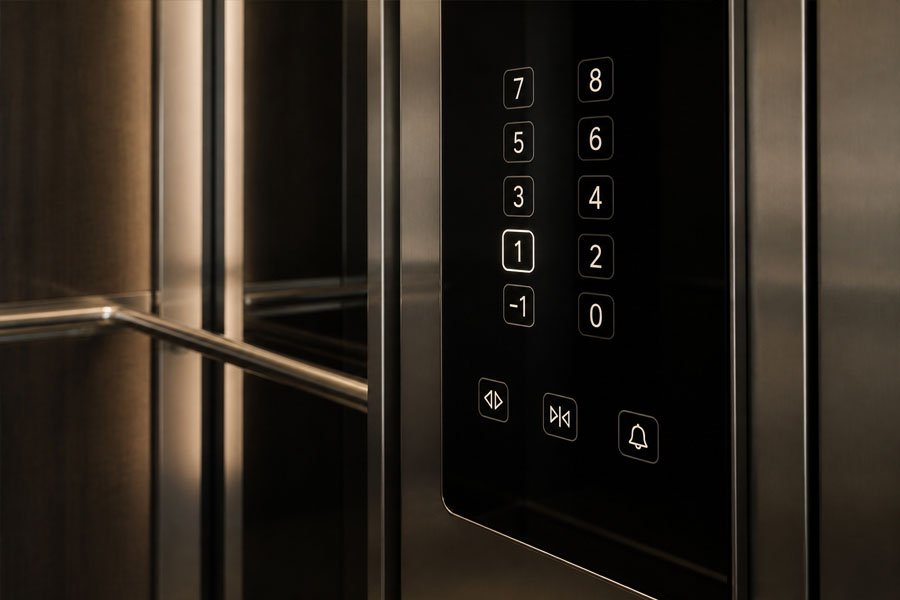
A مصعد يعمل بضغطة زر COP يستخدم أزرارًا تعمل باللمس بدلاً من الأزرار الميكانيكية التقليدية. وغالبًا ما يتم دمجه مع زجاج أسود، أو فولاذ مقاوم للصدأ عاكس، أو واجهة أنيقة وعصرية.
قد تشمل شروط السوق ما يلي: نظام اللمس السعوي (COP), زر زجاجي يعمل باللمس COP, ، أو مصعد مزود بوحدة التحكم (COP) بأزرار تعمل باللمس.
تتميز لوحات الأزرار التي تعمل باللمس بمظهر أنيق وعصري. وعادةً ما يكون سطحها مسطحًا، مما يسهل مسحها وصيانتها. كما أن الرموز المضاءة من الخلف تضفي تأثيرًا بصريًّا راقيًّا، لا سيما في الفنادق والغرف السكنية الفاخرة.
غالبًا ما يتم اختيار هذا النوع عندما يتعين أن يتناسب تصميم المصعد مع أسلوب داخلي عصري. فهو يجعل وحدة التحكم (COP) تبدو أقل ميكانيكية وأكثر انسجامًا مع ديكور المقصورة.
يجب أن تكون واجهة اللمس مستقرة عند الاستخدام الفعلي. وينبغي على المشترين الانتباه إلى ما يلي:
لا تُعد أزرار اللمس الخيار المناسب لجميع المشاريع. ففي بيئات الاستخدام العام المكثف أو بيئات نقل البضائع، قد يظل الزر المادي المتين هو الخيار الأفضل. ولأغراض السلامة، لا تزال العديد من المشاريع تحتفظ بزر طوارئ مادي مستقل حتى عندما تستخدم الوظائف الأخرى أزرار اللمس.
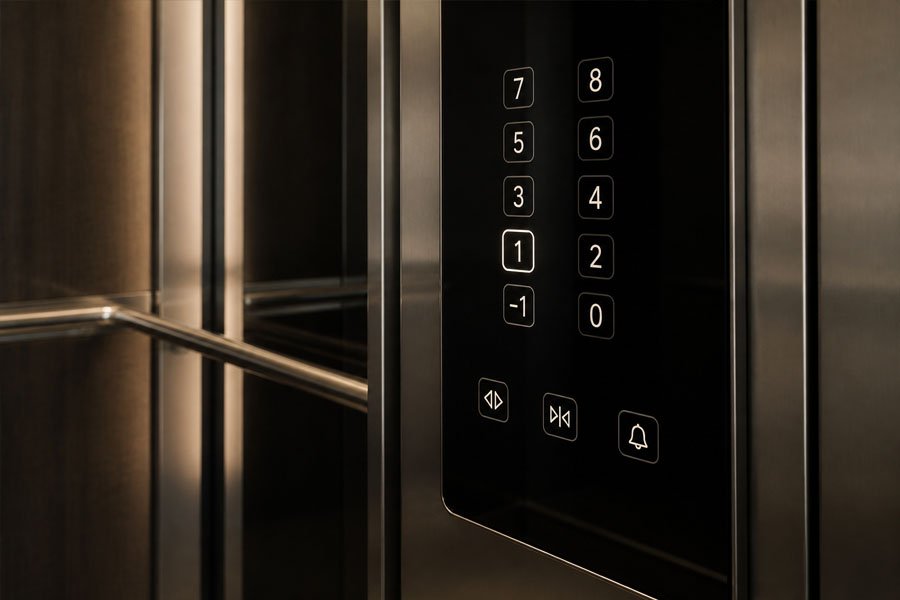
A وحدة التحكم في المصعد المزودة بشاشة تعمل باللمس تستخدم شاشة كواجهة مستخدم رئيسية. وهي أكثر مرونة من لوحة الأزرار التي تعمل باللمس، حيث يمكن تصميم الواجهة وتحديثها وتخصيصها عبر البرامج.
ويمكن وصفه أيضًا بأنه وحدة التحكم في المصعد المزودة بشاشة تعمل باللمس, وحدة معالجة البيانات (COP) بشاشة LCD تعمل باللمس, ، أو لوحة التحكم في السيارة المزودة بشاشة تعمل باللمس.
يمكن أن تدعم وحدة معالجة البيانات (COP) المزودة بشاشة تعمل باللمس عرض المزيد من المعلومات وتوفير تفاعل أكثر مرونة، مثل:
الميزة الأكبر هي المرونة. فجهاز COP التقليدي مقيد بأزرار ثابتة وتسميات ثابتة. أما واجهة الشاشة التي تعمل باللمس، فيمكنها عرض تخطيطات أو لغات أو معلومات خدمية مختلفة وفقًا لاحتياجات المبنى.
في المشاريع الراقية، يمكن أن يؤدي ذلك إلى تحسين تجربة الركاب وإضفاء طابع أكثر ذكاءً على المصعد. كما يمكن أن يقلل من الحاجة إلى العديد من الأزرار المادية في حالة وجود العديد من الطوابق أو المناطق الخاصة.
جهاز تسجيل الحوادث (COP) المزود بشاشة تعمل باللمس أكثر تعقيدًا من الجهاز العادي لوحة أزرار المصعد. قبل شرائه، يجب على المشترين التأكد مما يلي:
لا تعني الشاشة التي تعمل باللمس بالضرورة أنها أفضل. فهي مناسبة عندما يتطلب المشروع تفاعلًا رقميًّا، أو شاشة مرنة، أو تكاملاً مع أنظمة المباني الذكية. أما بالنسبة للمشاريع السكنية البسيطة أو مشاريع الشحن، فقد تؤدي إلى تكاليف إضافية وأعمال صيانة غير ضرورية.
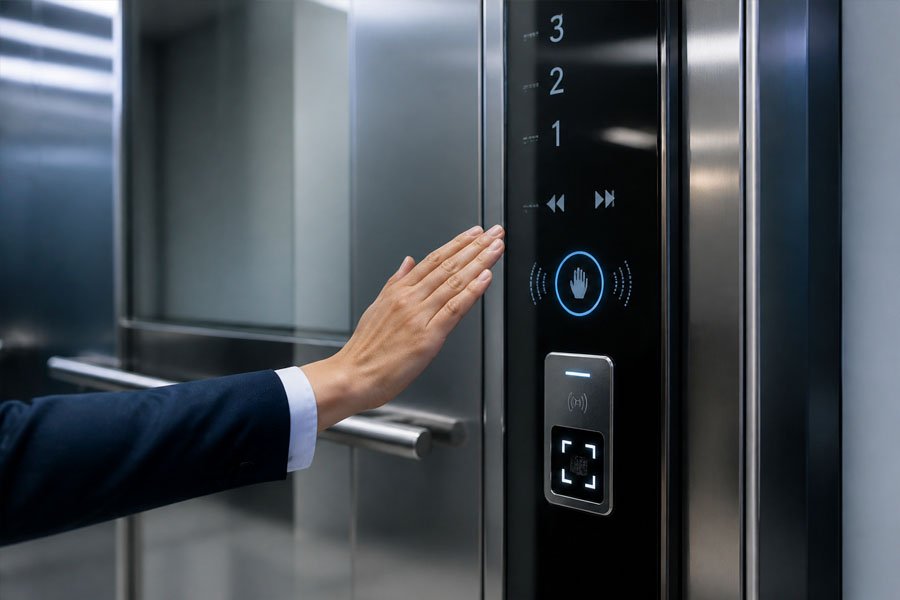
A كفاءة الطاقة (COP) للمصاعد الذكية أو التي تعمل بدون لمس تدمج بين أنظمة التحكم القائمة على أجهزة الاستشعار، وأنظمة التحكم في الدخول، وأحيانًا أنظمة الذكاء في المباني. فهي ليست مجرد لوحة خالية من الأزرار، بل هي واجهة تشغيل أكثر ترابطًا.
تشمل المصطلحات الشائعة في مجال التسويق ما يلي: مصعد يعمل بدون لمس COP, زر المستشعر COP, لوحة التحكم الذكية للمصعدو نظام التحكم في الوصول (COP) للمصاعد.
يمكن لهذا النوع من الأجهزة الحد من التلامس المباشر باليد، وتحسين إدارة الدخول، ودعم التشغيل الأكثر ذكاءً للمباني. وبالنسبة للمستشفيات أو أبراج المكاتب ذات الكثافة المرورية العالية، يمكن أن يؤدي التشغيل بدون لمس أو الذي يخضع للتحكم في الدخول إلى تحسين النظافة وإدارة حركة المرور.
بالنسبة للمشاريع المتميزة، فإن نظامًا ذكيًّا مصعد COP كما يمكن أن يسهم في تحسين صورة المبنى. فهو يوضح أن نظام المصاعد ليس مجرد أداة نقل فحسب، بل جزء من البنية التحتية الذكية للمبنى.
يجب أن تتناسب الوظائف الذكية مع المشروع الفعلي. ولا ينبغي للمشترين اختيارها لمجرد مظهرها. ومن النقاط المهمة ما يلي:
لا تكون وحدة التحكم في المصعد الذكية أو التي تعمل بدون لمس ذات قيمة إلا عندما تتوافق مع التدفق الفعلي لحركة المرور في المبنى، واحتياجات التحكم في الدخول، وقدرة الصيانة.
يقدم الجدول أدناه مقارنة بسيطة بين... مصعد COP الأنواع.
| نوع COP | الميزة الرئيسية | الأفضل لـ | القيد الرئيسي |
|---|---|---|---|
| مصعد يعمل بضغطة زر COP | الأزرار المادية | معظم المشاريع القياسية | مظهر أقل فخامة |
| مصعد مجهز لتسهيل الوصول (COP) | برايل، اللمس، التغذية الراجعة السمعية/البصرية | المباني العامة ومباني الرعاية الصحية | يجب الالتزام بقواعد إمكانية الوصول المحلية |
| مؤشر كفاءة الطاقة للمصعد مع شاشة رقمية | شاشة عرض الطابق والحالة | مشاريع المكاتب والفنادق والمشاريع السكنية | التوافق مع شاشات العرض أمر مهم |
| مصعد يعمل بأزرار اللمس COP | واجهة لمس مسطحة | الفنادق والمباني الحديثة | تستلزم الحساسية والصيانة عنايةً خاصة |
| وحدة التحكم في المصعد المزودة بشاشة تعمل باللمس | شاشة واجهة المستخدم الرقمية | المباني الذكية والمشاريع الفاخرة | ارتفاع التكلفة وتعقيد النظام |
| مؤشر كفاءة الطاقة (COP) للمصاعد الذكية أو التي تعمل بدون لمس | أجهزة الاستشعار، وأنظمة الدخول، والتكامل مع الأجهزة المحمولة | المشاريع الراقية والمراعية لمعايير النظافة | يتطلب تكاملاً أقوى بين الأنظمة |
هذه المقارنة لا تعني أن أحد الأنواع أفضل دائمًا من الآخر. الأفضل لوحة التحكم في المصعد هو النظام الذي يتوافق مع نوع المبنى، وعادات الركاب، ونظام التحكم، وخطة الصيانة.
لا يقتصر اختيار لوحة COP على مجرد اختيار لوحة ذات مظهر جميل فحسب، بل هو قرار تقني وعملي. قبل طلب لوحة COP قياسية أو مخصصة، تحقق من النقاط التالية.
تختلف الأولويات باختلاف المباني.
وهذا الأمر مهم بشكل خاص في مشاريع الاستبدال. يجب أن يتوافق معامل الأداء (COP) الجديد مع نظام التحكم الحالي في المصعد.
يرجى التأكد من هذه التفاصيل قبل بدء الإنتاج:
إذا لم يتوافق جهاز التحكم (COP) مع وحدة التحكم، فقد تبدو اللوحة سليمة لكنها قد لا تعمل بشكل صحيح بعد التركيب.
استخدم الاحتياجات الفعلية للمبنى لاختيار الواجهة:
يؤثر تخطيط اللوحة على كل من التشغيل والتركيب. قبل الطلب، يرجى التأكد مما يلي:
بالنسبة للمشاريع المخصصة، يجب التأكد من صحة الرسومات قبل البدء في الإنتاج. وهذا يساعد على تجنب مشاكل التركيب في الموقع.
لا يكفي أن تكون وحدة التحكم (COP) جميلة فحسب، بل يجب أن تكون صالحة للاستخدام أيضًا.
اطرح هذه الأسئلة:
في العديد من مشاريع B2B، تُعد سهولة الصيانة أمرًا لا يقل أهمية عن المظهر.
يخلط العديد من المشترين بين COP و LOP. وكلاهما لوحة تشغيل للمصعد، لكنهما يُركبان في أماكن مختلفة ويؤديان وظائف مختلفة.
| العنصر | معامل الأداء (COP) للمصعد | مسار المصعد (LOP) |
|---|---|---|
| الاسم الكامل | لوحة التحكم في السيارة | لوحة التحكم في الهبوط |
| الموقع | داخل مقصورة المصعد | باب الهبوط الخارجي |
| الوظيفة الرئيسية | اختر الطابق ووظائف مقصورة التحكم | استدعاء المصعد إلى الطابق الحالي |
| الأزرار الشائعة | مفاتيح أرضية، وأبواب، وإنذار، ومفاتيح تشغيل | أزرار الاتصال لأعلى/لأسفل |
| التعقيد | المزيد من الوظائف | وظائف أبسط |
| التخصيص | أعلى | أدنى |
بعبارات بسيطة، يقوم «LOP» باستدعاء المصعد من الخارج، بينما يتحكم «COP» في المصعد من داخل الكابينة.
يتم استخدام جهاز COP عدة مرات يوميًا، لذا قد تظهر بعض المشكلات بعد الاستخدام لفترات طويلة. وتعود أسباب بعض هذه المشكلات إلى الأزرار، بينما ترتبط مشكلات أخرى بالأسلاك أو لوحات الدوائر المطبوعة أو وحدات العرض أو اتصالات وحدة التحكم.
| المشكلة | السبب المحتمل | ما الذي يجب التحقق منه |
|---|---|---|
| الزر لا يستجيب | عطل في المفتاح أو مشكلة في الأسلاك | أزرار التلامس، لوحات الدوائر المطبوعة، الأسلاك |
| مصباح الإشارة مطفأ | مشكلة في مصابيح LED أو في التيار الكهربائي | وحدة LED، الجهد الكهربائي، الموصل |
| إشارة الطابق الخاطئة | عدم توافق الأسلاك | توصيلات جهاز التحكم في درجة الحرارة (COP) ومدخلات وحدة التحكم |
| الشاشة لا تعمل | عطل في الشاشة أو في الاتصال | وصلة بين وحدة العرض ووحدة التحكم |
| زر اللمس لا يستجيب | مشكلة في المستشعر أم في الزجاج | إعدادات الحساسية، حالة السطح |
| تعطل زر الطوارئ | مشكلة في دائرة الإنذار | خط الإنذار، نظام الاتصال الداخلي، مصدر الطاقة الاحتياطي |
| اللوحة مخدوشة أو متآكلة | مواد رديئة أو بيئة قاسية | مادة اللوحة الأمامية وتشطيبها |
يجب أن يتولى إصلاح واستبدال لوحة التحكم (COP) متخصصون مؤهلون في مجال المصاعد. فهذه اللوحة متصلة بنظام التحكم في المصعد، وقد يؤثر التوصيل الخاطئ للأسلاك على التشغيل العادي أو وظائف السلامة.
معامل الأداء (COP) للمصعد يعني لوحة التحكم في كابينة المصعد. إنها لوحة التحكم الرئيسية داخل كابينة المصعد.
تتمثل الوظيفة الرئيسية لوحدة التحكم في المصعد (COP) في تمكين الركاب من اختيار الطوابق، وفتح الأبواب أو إغلاقها، وطلب المساعدة، والاطلاع على حالة المصعد. وهي بمثابة الواجهة المباشرة بين الركاب ونظام التحكم في المصعد.
تشمل الأنواع الشائعة وحدة التحكم في المصعد التي تعمل بضغطة زر، ووحدة التحكم في المصعد المخصصة لذوي الاحتياجات الخاصة، ووحدة التحكم في المصعد المزودة بشاشة رقمية، ووحدة التحكم في المصعد التي تعمل بأزرار تعمل باللمس، ووحدة التحكم في المصعد التي تعمل بشاشة تعمل باللمس، ووحدة التحكم في المصعد الذكية أو التي تعمل بدون لمس.
يتم تركيب جهاز التحكم الداخلي (COP) داخل كابينة المصعد. أما جهاز التحكم الخارجي (LOP) فيتم تركيبه خارج المصعد، وعادةً ما يكون بجانب باب الطابق. يستخدم الركاب جهاز التحكم الخارجي (LOP) لاستدعاء المصعد، ويستخدمون جهاز التحكم الداخلي (COP) لاختيار الطابق المقصود بعد دخولهم الكابينة.
ليس دائمًا. تعتبر وحدة التحكم (COP) التي تعمل باللمس أكثر مرونة وحداثة، لكن وحدة التحكم التي تعمل بالأزرار غالبًا ما تكون أكثر متانة وأسهل في الصيانة وأكثر ملاءمة للمشاريع القياسية. ويعتمد الاختيار الأفضل على نوع المبنى والميزانية وخطة الصيانة.
نعم. تشمل خيارات التخصيص الشائعة حجم اللوحة، وعدد الأزرار، وملصقات الأرضية، وشاشة العرض، وخامة اللوحة الأمامية، ولون مصابيح LED، وكتابة برايل، والشعار، ومفاتيح التشغيل، ووحدات التحكم في الدخول.
للاستعاضة عن وحدة التحكم في المصعد (COP)، يجب أولاً التحقق من وحدة التحكم الحالية في المصعد، ونوع الإشارة، والجهد الكهربائي، وطريقة التوصيلات الكهربائية، وحجم اللوحة، وتوزيع الأزرار، وواجهة العرض، وأبعاد التركيب. فالتوافق أكثر أهمية من المظهر وحده.
اختيار الخيار المناسب مصعد COP لا يقتصر الأمر على المظهر فحسب، بل إنه يؤثر أيضًا على تشغيل المصعد، وسهولة الوصول إليه، والسلامة، والاتصالات، والصيانة، وتوافق الأنظمة. ومن خلال فهم الأنواع المختلفة من لوحات التحكم في المصاعد — بدءًا من لوحات الأزرار وحتى الواجهات الذكية التي تعمل بدون لمس — يمكنك اختيار لوحة التحكم المناسبة للمصاعد في المباني السكنية، والفنادق، والمستشفيات، ومصاعد الشحن، ومشاريع التحديث.
إذا كنت بحاجة إلى منتجات قياسية أو مخصصة مصعد COP حلول لمشروع تركيب جديد أو مشروع تحديث،, اتصل بفريقنا للحصول على الدعم الفني وعرض أسعار تنافسي.